> For the complete documentation index, see [llms.txt](https://docs.pinjamlabs.com/llms.txt). Markdown versions of documentation pages are available by appending `.md` to page URLs; this page is available as [Markdown](https://docs.pinjamlabs.com/your-guide-to-using-pinjam/basic-functions/claiming-worked-yields.md).
# Claiming Worked Yields
Here is how you can claim your worked yields from lending out your assets.
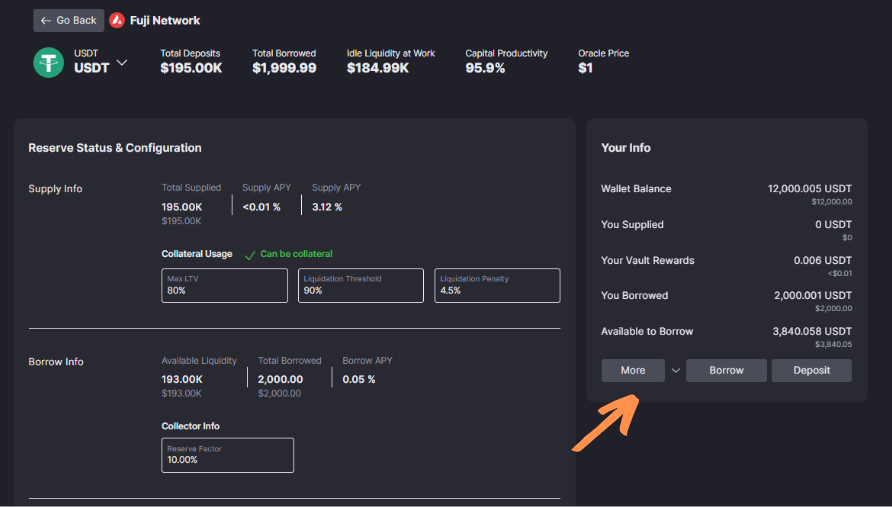
First, head over to the Reserve Overview page as shown below (can be accessed by heading over to the Home Page and clicking the Details button available for each asset).
Click the More button as shown in the image below.
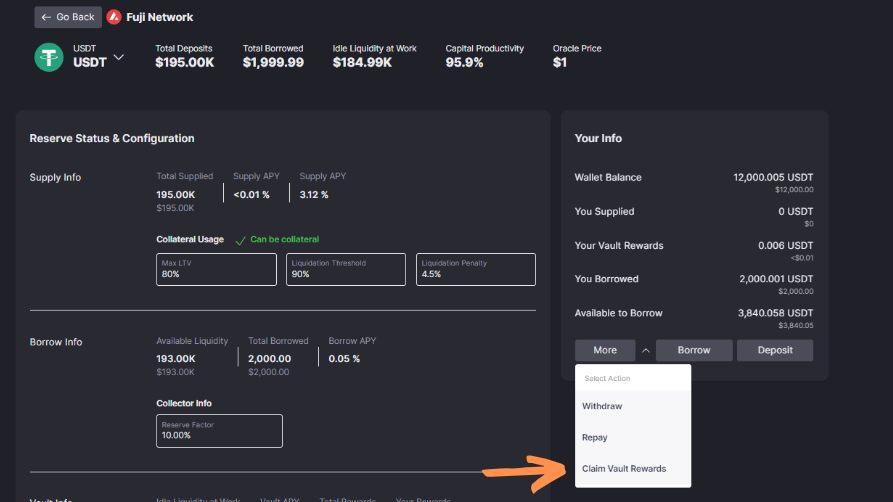
A drop-down menu will then pop up allowing you to select specific actions. Select Claim Vault Rewards, and click Claim.
Complete the necessary steps on your desired wallet to complete the transaction.
You will then receive the worked yields in your wallet.
It's as easy as that to enjoy your yields from Pinjam!